
How to Calculate Battery Life for Dragino Sensors Using ER26500 and SPC1520
Updated: 2 days ago
A Dragino sensor can run for years on one battery pack, but the real life is not found by reading a simple percentage on the device. The ER26500 lithium-thionyl chloride cell has a flat discharge curve, the radio draws short high-current bursts, and temperature can change what the battery can deliver.
That is why battery life needs a calculation, not a guess.
This guide explains how the ER26500 + SPC1520 pack works, how to estimate run time, when to replace the pack, and why transmission interval matters so much for LoRaWAN and NB-IoT sensors.
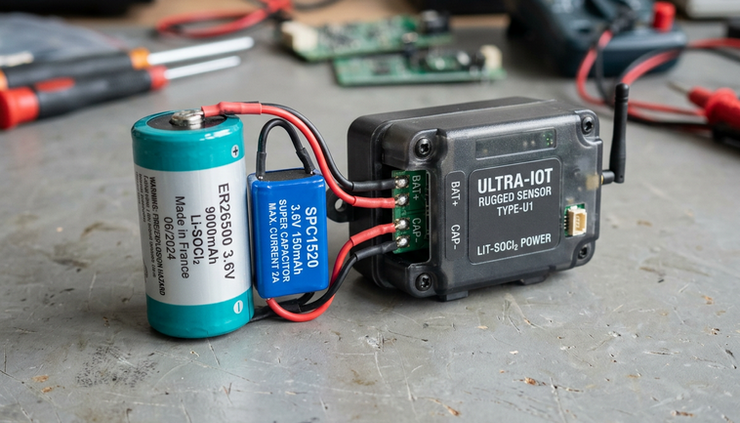
What the ER26500 and SPC1520 battery pack does
The common Dragino outdoor sensor battery pack combines two parts:
ER26500 battery
A non-rechargeable Li-SOCl2 lithium-thionyl chloride battery, typically rated around 8,500 mAh. It is designed for low-current, long-duration use.
SPC1520 capacitor
A capacitor used to support short current bursts during radio transmission, especially when messages are frequent or the sensor operates in cold conditions.
This setup is common in long-life IoT devices, such as water meters, environmental sensors, parking sensors, and other outdoor monitoring products. Dragino uses this kind of pack widely because many sensors spend most of their time asleep, then wake for a short reading and uplink.
The ER26500 is the energy source. The SPC1520 is the helper that handles short bursts better than the battery alone.
That detail matters because LoRaWAN and NB-IoT devices do not draw power evenly. A sensor may sleep at microamp or low milliamp levels for minutes, then draw much higher current for a few seconds while it measures, joins, transmits, or retries.
Why voltage is not a simple battery percentage
Many users expect battery voltage to work like a phone battery icon. With an ER26500 cell, that assumption leads to bad estimates.
Li-SOCl2 batteries have a nonlinear discharge curve. For much of their life, the voltage can stay fairly stable. Near the end, the voltage falls more sharply. That means a reading near the normal operating range does not always tell you exactly how much capacity remains.
A sensor may report a voltage that looks acceptable for a long time, then drop faster as the battery reaches the end of its useful life.
For this battery type, a practical replacement rule is:
If the battery voltage drops below 2.7 V, plan to replace the battery pack.
A replacement battery should be in the 2.7 V to 3.6 V operating range for the device. In most cases, a Li-SOCl2 replacement is recommended because it matches the low-current, long-life use pattern these sensors were designed for.
Do not use voltage alone to calculate remaining months or years. Use voltage as a replacement warning, then use current consumption and uplink behavior to estimate expected life.
The basic formula for battery life
To estimate battery life, calculate how much energy the sensor consumes per day, then divide the usable battery capacity by that daily consumption.
The simple formula is:
```text
Battery life in days = usable battery capacity in mAh ÷ average daily consumption in mAh
```
Then convert days to years:
```text
Battery life in years = battery life in days ÷ 365
```
For an ER26500 pack rated at 8,500 mAh, do not assume every milliamp-hour is usable in the field. Real life can be lower because of:
Cold weather
High transmit current
Short reporting intervals
Network retries
NB-IoT registration behavior
Battery age and storage history
Sensor warm-up time
End-of-life voltage limits
A practical calculation often uses a derating factor.
```text
Usable capacity = rated capacity × derating factor
```
For example, if you use 80% as a planning assumption:
```text
8,500 mAh × 0.8 = 6,800 mAh usable capacity
```
That is not a guaranteed value. It is a conservative planning method. For critical deployments, use the sensor datasheet, the battery datasheet, and field measurements.

Break the current draw into operating states
A Dragino sensor does not use one constant current. It moves through several states. To calculate average consumption, estimate each state separately.
Common states include:
Sleep mode
Sensor reading or warm-up
LoRaWAN or NB-IoT transmission
Receive windows or downlink listening
Join, attach, or reconnect events
Retries after failed transmissions
The daily consumption formula looks like this:
```text
Daily consumption =
sleep consumption per day
+ measurement consumption per day
+ transmission consumption per day
+ retry and network overhead
```
Calculate sleep consumption
Sleep mode usually dominates time, even if it does not dominate current.
```text
Sleep mAh per day = sleep current in mA × sleep hours per day
```
If a device sleeps at 0.02 mA for almost 24 hours:
```text
0.02 mA × 24 h = 0.48 mAh per day
```
That is small, but over years it still matters.
Calculate measurement consumption
Some sensors need time to power the sensing element before reading. This is common for environmental, soil, ultrasonic, or industrial sensors.
```text
Measurement mAh per day =
measurement current in mA × measurement duration in hours × measurements per day
```
If a sensor uses 20 mA for 5 seconds and measures 288 times per day, which is every 5 minutes:
```text
5 seconds = 5 ÷ 3,600 hours = 0.00139 hours
20 mA × 0.00139 h × 288 = 8.0 mAh per day
```
A short warm-up time can become a major part of the total when the reporting interval is short.
Calculate transmission consumption
Radio transmission is where many battery estimates go wrong.
```text
Transmission mAh per day =
transmit current in mA × transmit duration in hours × uplinks per day
```
If a device transmits once every 15 minutes, it sends 96 uplinks per day. If each uplink event averages 120 mA for 2 seconds:
```text
2 seconds = 2 ÷ 3,600 hours = 0.00056 hours
120 mA × 0.00056 h × 96 = 6.45 mAh per day
```
If you change the interval to every 5 minutes, the uplinks rise to 288 per day:
```text
120 mA × 0.00056 h × 288 = 19.35 mAh per day
```
The transmit behavior did not change. Only the interval changed. Yet the radio portion of daily energy use tripled.
This is the heart of How to Calculate Battery Life for Dragino Sensors Using ER26500 and SPC1520: count the time spent in each power state, then multiply by how often that state happens.
A worked example using a 5-minute uplink interval
Here is a simple planning example. The numbers below are illustrative, so replace them with values from the device datasheet, configuration, or measurement.
Assume:
Item | Value |
Battery rated capacity | 8,500 mAh |
Planning derating factor | 80% |
Usable capacity | 6,800 mAh |
Sleep current | 0.02 mA |
Measurement current | 20 mA |
Measurement duration | 5 seconds |
Transmission current | 120 mA |
Transmission duration | 2 seconds |
Uplink interval | 5 minutes |
Uplinks per day | 288 |
Now calculate each part.
Power use | Calculation | Result |
Sleep | 0.02 mA × 24 h | 0.48 mAh/day |
Measurement | 20 mA × 0.00139 h × 288 | 8.0 mAh/day |
Transmission | 120 mA × 0.00056 h × 288 | 19.35 mAh/day |
Estimated total | Sum of above | 27.83 mAh/day |
Now calculate battery life:
```text
6,800 mAh ÷ 27.83 mAh/day = 244 days
244 ÷ 365 = 0.67 years
```
This example does not reach the often-quoted 8 to 10 years because the uplink interval is quite frequent and the assumed measurement and radio currents are significant.
Now compare that with a 60-minute interval.
Uplinks per day drop from 288 to 24.
Power use | Result |
Sleep | 0.48 mAh/day |
Measurement | 0.67 mAh/day |
Transmission | 1.61 mAh/day |
Estimated total | 2.76 mAh/day |
Battery life estimate:
```text
6,800 mAh ÷ 2.76 mAh/day = 2,464 days
2,464 ÷ 365 = 6.75 years
```
The same battery and same device can move from months to years mainly because of the reporting interval.
Why the 5-minute recommendation matters
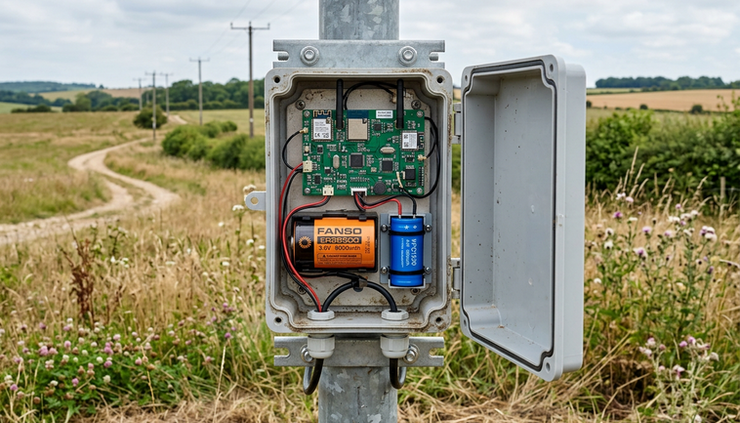
The ER26500 Li-SOCl2 battery is designed for small current over a long period. It is not ideal for frequent high-current bursts without support.
For this reason, a minimum uplink period of about 5 minutes is commonly recommended for this battery class. Sending more often than that can reduce battery life. It can also stress the battery during cold weather or weak network conditions.
This does not mean a Dragino sensor can never send faster than every 5 minutes. It means faster reporting should be treated as a special design choice. If you need a shorter period, check the real current profile and expect a shorter service life.
Several things can increase consumption during frequent uplinks:
Longer airtime from low data rates
Confirmed uplinks that require acknowledgements
Retransmissions after packet loss
NB-IoT network attach and reconnect events
Poor signal strength
Cold temperature reducing battery performance
LoRaWAN and NB-IoT also behave differently. LoRaWAN airtime depends on spreading factor, payload size, and regional settings. NB-IoT current use can vary with signal quality, carrier behavior, and power saving settings. For accurate estimates, measure the actual device in the real network mode.
What the SPC1520 changes
The SPC1520 does not magically add thousands of milliamp-hours to the ER26500. Its main job is to support pulse current.
During transmission, the sensor may need a current burst that is much higher than the long-term average. The capacitor can help supply that short burst and reduce stress on the Li-SOCl2 cell.
This is especially useful when:
The reporting interval is below 5 minutes
The device transmits often
The sensor operates in low temperatures
The radio has longer transmit or reconnect events
The battery is older and less able to supply peak current
Using an ER26500 without the SPC1520 may still work, but performance can drop. The likely issues are shorter battery life and less reliable current delivery during cold weather or high-current events.
If a replacement pack does not include an SPC1520, some users reuse the capacitor from the old pack. If doing that, be careful with polarity, insulation, connector type, and mechanical mounting.
Positive and negative pins must match. Reversed polarity can damage the sensor.
When and how to replace the battery pack
Replace the battery when the reported voltage falls below 2.7 V, or sooner if the device becomes unreliable under load.
A safe replacement process should include these checks:
Confirm the battery chemistry
Use a compatible non-rechargeable Li-SOCl2 battery for long-term outdoor deployments unless the device documentation specifies another type.
Check the voltage range
The battery should match the required operating range, typically within 2.7 V to 3.6 V for this kind of pack.
Match the connector
Confirm the connector type, wire order, and physical fit before plugging it in.
Keep the SPC1520 if needed
For high-frequency reporting or low-temperature sites, use the SPC1520 capacitor with the ER26500 pack when possible.
Check polarity before connection
Verify positive and negative leads. Do not rely only on wire color if the pack came from a different supplier.
Seal the enclosure properly
Outdoor sensors need their seals restored after battery replacement. Moisture can cause failures that look like battery problems.
Battery documents worth keeping with the maintenance record include:
Battery dimensions
Lithium-thionyl chloride battery datasheet
Battery technical specification
Lithium-ion capacitor or SPC1520 datasheet
Battery report and certificate
Connector type details
These documents help avoid choosing a pack that fits electrically but fails mechanically, or fits physically but cannot handle field conditions.
Practical ways to extend battery life
The best battery life gains usually come from configuration, not from swapping to a larger cell.
Start with the reporting interval. A device sending every hour can last far longer than the same device sending every 5 minutes. If the application does not need near-real-time data, increase the interval.
Use confirmed uplinks only when needed. Confirmed LoRaWAN messages can add receive windows, acknowledgements, and retries. For routine sensor readings, unconfirmed uplinks are often enough, depending on the application.
Improve signal quality. Poor signal can increase airtime, retries, or connection effort. Antenna placement, gateway coverage, enclosure position, and mounting height all affect energy use.
Avoid unnecessary sensor warm-up. Some sensors consume more power during measurement than during transmission. If readings can be averaged less often, or if warm-up time can be reduced within the device’s supported settings, battery life improves.
Plan for temperature. Cold weather can reduce the battery’s ability to deliver current bursts. The SPC1520 helps, but it does not remove the need for realistic field testing.
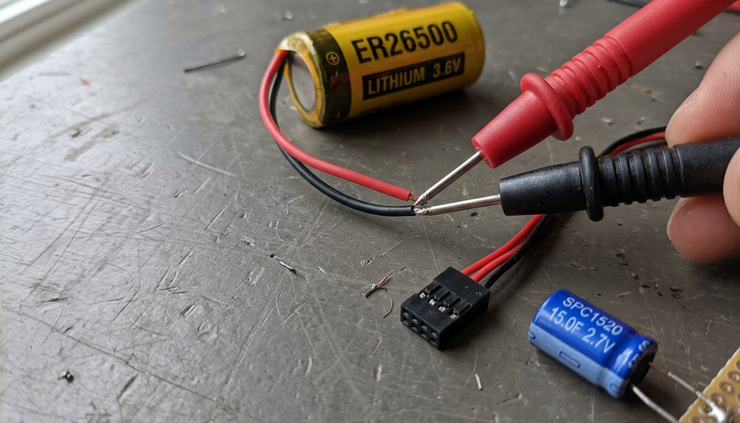
Measure if the deployment matters. A current meter or power analyzer gives better answers than estimates. Capture a full cycle, including sleep, measurement, transmit, receive windows, and retries.
A simple battery life checklist
Before deploying a Dragino sensor, record these values:
Parameter | Why it matters |
Battery rated capacity | Sets the starting energy budget |
Usable capacity assumption | Adds real-world margin |
Sleep current | Controls baseline consumption |
Measurement current and time | Can dominate frequent reporting |
Transmit current and time | Drives pulse load and daily energy use |
Uplink interval | Sets how many cycles happen per day |
Network type | LoRaWAN and NB-IoT have different profiles |
Signal quality | Poor links usually cost more energy |
Temperature range | Cold affects pulse performance |
SPC1520 present | Helps with current bursts |
With those values, the estimate becomes straightforward:
```text
Daily mAh = sleep mAh + measurement mAh + transmit mAh + overhead
Battery life = usable capacity ÷ daily mAh
```
The ER26500 + SPC1520 pack is a strong choice for long-running Dragino sensors when the device sleeps most of the time and sends at a reasonable interval. Treat 8 to 10 years as something a low-power, low-frequency deployment can approach, not as a fixed promise.
Use voltage below 2.7 V as the replacement warning. Use current, time, and uplink frequency to estimate service life. Keep the SPC1520 in the design when transmissions are frequent or the site gets cold. And before a large deployment, test one real sensor with the exact settings, network, and environment it will use in the field.
Need help with your application?
ProSense Instruments — explore instruments, sensors, data loggers and test equipment.
ProSense Solutions — discuss complete monitoring and automation systems.
ProSight Software — explore cloud dashboards, alarms and reporting. Device integration must be confirmed for your application.
Instrument enquiries: sales@prosenseinstruments.com.au | 1800 560 854
Project enquiries: sales@prosense.com.au. Software enquiries: info@prosightsoftware.com.
Comments