
Using Monnit to Catch Doors Left Open After Hours
A door left open after shift change can create a long list of problems before anyone notices. Warm air enters a chilled storage area. Dust and pests reach stock. Tools or materials sit exposed. In a loading bay, an open access door can also signal that a process has broken down, such as a missed close-out check or a delivery that ran past the usual schedule.
Monnit wireless sensors give facilities a practical way to spot those exceptions. Instead of relying only on end-of-day walkarounds or camera review, a door sensor can report when an access door opens, closes, or stays open beyond an allowed period. That makes it easier to see what happened, when it happened, and which door needs attention.
For loading areas, storage rooms, plant rooms, workshops, and industrial facilities, the value is simple: turn an unnoticed open door into a recorded event and a timely alert.

Why after-hours door monitoring matters
Most facilities already have some form of lock-up routine. Someone checks doors, confirms equipment is shut down, and leaves the site in a known state. The issue is what happens after that routine.
A door can be reopened by a late delivery. A contractor can leave through a side entrance and forget to pull it closed. A storage room door can bounce back from the latch. In industrial spaces, airflow, vibration, forklifts, and worn hardware can all turn a “closed” door into an open one.
A Monnit door monitoring setup helps answer three basic questions:
Which door opened?
How long did it remain open?
Who needs to know before the next morning?
That last part matters most. Reporting is useful for review, but the real gain comes from fast notification. If a storage area door is still open 20 minutes after closing time, the right person can receive an alert while the issue can still be fixed.
This can support several facility goals:
Better protection for inventory and equipment
Fewer temperature control problems in conditioned spaces
Cleaner records for shift handover
Faster response to unexpected access
Clearer evidence of recurring process issues
Monnit should be seen as part of a wider site management approach. It does not replace locks, access control, safety systems, or security procedures. It fills a specific gap: visibility when a door changes state or remains open longer than expected.
Where door sensors make the biggest difference
Not every door needs the same level of monitoring. The best place to start is with doors that create risk when they are left open.
Loading dock and warehouse doors
Loading areas are active, noisy, and easy to overlook. Large roller doors may be opened for a short collection and then left partly raised. Personnel doors beside loading bays may be used by drivers, contractors, or maintenance staff after the main team has left.
These doors are strong candidates for monitoring because they often sit on the edge of the building envelope. When they remain open, they can affect security, temperature, dust entry, and pest control.
For loading docks, pay attention to:
Doors used outside normal shipping hours
Doors hidden from the main exit route
Doors with worn closers or latches
Doors near external yards or vehicle access points
A simple open or closed report can reveal habits that are hard to see during the day. If the same dock door opens after hours several times a week, the event history can help the site manager find out whether that is planned activity or a missed control point.
Storage rooms and stock areas
Storage rooms are easy to forget because they may not look like high-risk areas. Yet many contain tools, consumables, parts, chemicals, records, samples, or finished goods.
A door left open in a parts room can lead to missing items. A door left open in a temperature-sensitive stock area can create quality issues. Even where security is not the main concern, an open door can break the chain of accountability.
Monnit sensors can be used on:
Internal stockroom doors
Cage access gates
Maintenance stores
Cold rooms and cool storage entrances
Chemical or janitorial storage areas
The aim is not to flood managers with every opening during the workday. The useful setup is usually based on rules, such as alerts only after hours, alerts only if the door stays open too long, or reports that group events by location and time.
Industrial facilities and plant rooms
Industrial sites often have isolated access points. Plant rooms, pump rooms, compressor areas, electrical rooms, and service corridors may be visited by different teams at different times.
A door may be left open for ventilation during maintenance, then forgotten. A latch may fail due to vibration. A technician may prop a door for convenience and miss it during exit checks.
For these areas, door monitoring can provide useful operational records as well as alerts. If a plant room door opened at 2:13 a.m., the event log gives a starting point for investigation. If a door opens repeatedly outside planned maintenance windows, the pattern may show a training, procedure, or hardware issue.
Sensor placement affects the quality of the data
A door sensor is only as useful as the event data it produces. Good placement helps prevent false alerts, missed events, and confusing records.
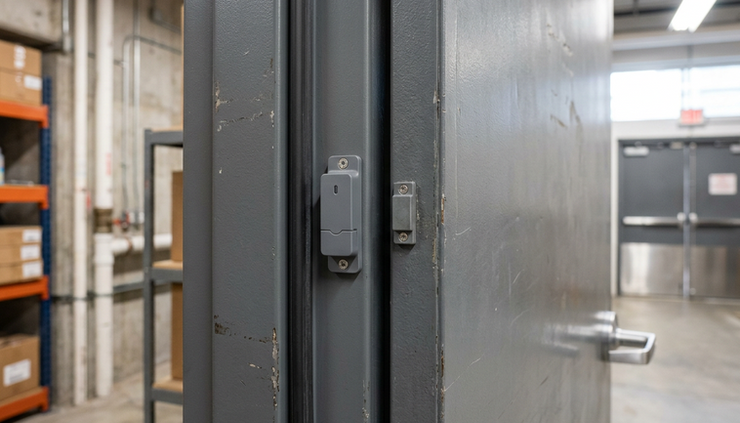
Most door monitoring setups use a sensor body and a magnet. When the door is closed, the magnet sits near the sensor. When the door opens, the gap changes and the sensor reports the change of state.
That sounds simple, but industrial doors can make placement tricky.
Put the sensor where the door’s movement is clear
On a standard personnel door, the sensor is often placed near the top of the door on the latch side. This location usually gives a clear change when the door opens and keeps the device out of casual impact zones.
On roll-up or sectional doors, placement needs more thought. The sensor must be positioned so it reliably detects the open or closed state you care about. In some cases, that means detecting when the door is fully closed. In other cases, the key issue is whether it has been lifted beyond a set point.
Good placement avoids areas where:
Forklifts, pallets, or carts may strike the device
Water, washdown, or debris may damage the sensor
Metalwork causes poor alignment
The magnet can shift during door vibration
Staff may knock the sensor during normal use
Match the sensor to the environment
A clean internal storage room is different from a humid loading bay or a dusty production area. Before choosing devices, review the site conditions.
Look at:
Door material and frame type
Expected temperature range
Moisture, dust, or washdown exposure
Distance to the nearest gateway
Battery access for maintenance
Risk of impact or tampering
Wireless sensors are appealing because they reduce cable runs, but radio conditions still matter. Thick walls, metal cladding, machinery, racking, and distance can affect signal strength. A practical survey helps decide where a gateway should sit and whether any areas need a different approach.
Name each sensor clearly from the start
Good reporting starts with clear naming. “Door 1” may make sense during installation, but it becomes useless six months later when someone receives an alert at night.
Use names that describe the location in plain language:
Loading Bay 3 Roller Door
Maintenance Store Rear Door
Cold Room Personnel Door
Chemical Store External Door
Plant Room North Entrance
Clear names reduce decision time. If an alert says the Cold Room Personnel Door has remained open after hours, the responder knows where to go and what the risk may be.
Event reporting should separate useful alerts from noise
Door monitoring can become annoying if every normal event creates a message. The goal is not to alert on all activity. The goal is to flag the events that need attention.
Monnit systems can report door state changes and send notifications based on configured rules. The details of the setup depend on the chosen devices, gateway, account settings, and site needs, but the planning process should begin with a few basic questions.
Decide what counts as an exception
A door opening at 2 p.m. may be normal. The same door opening at 11 p.m. may need review. A door open for 30 seconds may not matter. A door open for 15 minutes may need action.
Useful exception rules can include:
Door opened outside normal operating hours
Door remains open longer than an allowed time
Door opens during a shutdown period
High-priority door opens at any time
Repeated openings occur in a short period
The time limit should fit the process. A loading dock door may need more time during dispatch. A chemical store or cold room door may need a much shorter threshold.
Send alerts to the right people
A sensor event has little value if it goes to someone who cannot respond. Before turning on alerts, map the response path.
For each monitored door, decide:
Who receives the first alert?
Should alerts differ by time of day?
Who covers weekends or shutdowns?
When should an event be escalated?
Which doors need reports rather than instant alerts?
For example, a loading bay door left open at 6:15 p.m. might go to the shift supervisor. The same alert at 1:00 a.m. may need to go to an on-call contact or security provider, depending on the site’s procedure.
Avoid sending every alert to a long list of people. That often leads to alert fatigue. A better setup sends the right event to the smallest responsible group.
Use reports to improve the process
After a few weeks, event history can show patterns. Maybe one door is left open every Friday. Maybe a storage area door opens after hours because cleaning staff use it as a shortcut. Maybe a loading door sensor shows repeated activity after closing because deliveries are being scheduled too late.
That reporting can lead to practical fixes:
Adjust the lock-up checklist
Repair or replace a worn closer
Change delivery windows
Add signs near problem doors
Train contractors on exit procedures
Move stock so a door no longer needs to be propped open
The sensor does not solve every issue by itself. It gives the facility team something better than guesswork.
Selecting a suitable Monnit package through ProSense Instruments
The right Monnit package depends on the number of doors, the building layout, the response process, and the reporting needs. ProSense Instruments can help match the package to the site instead of treating every door as the same job.
A small storage area may only need a few wireless door sensors and a suitable gateway. A larger industrial facility may need a wider plan that includes multiple monitored zones, careful gateway placement, and a naming structure that supports clear reporting.
When discussing a package, prepare a simple door list. It does not need to be perfect, but it should include enough detail to guide the selection.
Planning detail | Why it matters |
Number of doors to monitor | Helps size the sensor count and plan naming |
Door types | Personnel doors, roll-up doors, gates, and cages may need different mounting approaches |
Site layout | Distance, walls, metalwork, and machinery can affect wireless planning |
Alert rules | After-hours alerts, open-too-long alerts, and reporting needs shape the setup |
Environment | Temperature, moisture, dust, and impact risk affect device choice and placement |
Response contacts | Alerts should go to people who can act on them |
A good package is not only a box of sensors. It should include a plan for how the system will be used. That means thinking through device locations, gateway connection options, event naming, notification settings, and how reports will be reviewed.
For many sites, the best starting point is a focused pilot. Choose the doors that cause the most concern, such as the main loading dock, a rear store entrance, and one high-value storage room. Run the setup long enough to see real activity patterns. Then expand with better knowledge of alert timing, response needs, and installation conditions.
A practical setup plan for after-hours monitoring
A door monitoring project becomes much easier when it follows a clear sequence.
Start with a site walk. Note every door that could create a problem if left open after hours. Include small side doors, internal storage rooms, and access points that are not visible from the main exit.
Next, rank doors by risk. A rarely used cupboard does not need the same attention as a loading bay, cold room, or plant room. Focus first on doors that affect safety, security, product condition, or operational continuity.
Then decide what event matters for each door. Some doors only need after-hours open alerts. Others need an alert if they remain open too long during the day. A few may need both.
After that, plan the hardware. Confirm the door type, mounting surface, likely sensor position, and gateway location. Check signal considerations and environmental exposure before final device selection.
Once installed, test each door. Open it, close it, confirm the reported state, and check the alert timing. Do not skip this step. A sensor that is slightly misaligned may appear to work during installation but fail after vibration, temperature change, or repeated use.
Finally, review the first round of reporting. The early data will often show where rules need adjustment. If alerts are too frequent, tighten the schedule or increase the open-time threshold. If alerts arrive too late, shorten the delay or update the contact path.

What a successful system looks like
A successful Monnit door monitoring setup is quiet most of the time. It does not bury the team in messages. It reports normal activity, flags the exceptions, and helps the right person respond.
The best results usually come from a simple rule set:
Monitor the doors that matter most
Place sensors where they can report reliably
Use clear names for every location
Alert only on events that need action
Review reports often enough to spot patterns
Adjust thresholds after real-world use
Using Monnit to Identify Doors Left Open After Hours is less about adding another device to the building and more about closing a visibility gap. When a loading door, storage room, or industrial access point stays open after everyone has gone, the system should make that event clear, recorded, and hard to ignore.
ProSense Instruments can help define the right Monnit package for the doors, conditions, and reporting process on site. Start with the access points that cause the most risk, then build a monitoring plan that turns after-hours uncertainty into clear event data.


Comments